


C# Thread Synchronization
In the last section we started several threads and let them run side by side. As long as each thread worked on its own data, that was the whole story. This section is about what happens when threads share data: a counter, a number of free tickets, a bank balance, the console, a text box. Without care, two threads that update the same value can both succeed and still leave the wrong answer behind, and the program may print a different wrong answer every time you run it. We see this happen in real runs, find the part of the code that causes it, and protect it: first with the lock statement, then with the Monitor class, which adds timeouts and a way for threads to signal each other. We finish with the one thread that Windows Forms trusts with its controls, the UI thread.
Every console program below was built with .NET 8 and run, and every output shown is the real output of those runs. The Windows Forms programs were built and run on Windows (Windows Server 2025, .NET 8), and the screenshots come from those runs. Programs whose output depends on timing were run many times; the text says how many, and what came out.
Objectives
By the end of the section you should be able to:
- Explain data inconsistency, and show with a real run how two threads lose an update to a shared variable.
- Explain why
count++is not one step, and what a race condition is. - Find the critical section of a program and protect it with
lockon a dedicated lock object. - Describe what the compiler turns
lockinto (Monitor.Enter,Monitor.Exit,tryandfinally) and why thefinallymatters. - Use
Monitor.TryEnterwith a timeout, andMonitor.WaitandMonitor.Pulseto make two threads take turns. - Tell exclusive locks from non-exclusive ones, and limit the number of threads in a section with a
Semaphore. - Explain why a Windows Forms control may only be touched by the UI thread, and update it from a worker thread with
Control.Invokeor aBackgroundWorker.
Part 1: when threads share data
Shared resources and data inconsistency
A shared resource is anything more than one thread can use: in-memory data such as a class (static) variable or an instance variable, a method, or an external object such as a file. Data inconsistency happens when more than one thread uses a shared resource at the same time: one thread reads the data while another is writing it, and the result is wrong or mixed.
The cause is always the same. The operating system decides which thread runs when, and it can switch from one thread to another at almost any point. Your code does not control that order, so a program with this problem can give a different result on every run.
Worked example 1: three threads, one method
Three threads run the same method. The method prints the first half of a message, sleeps for one second, and prints the second half. Main joins the three threads and prints the total time.
using System;
using System.Diagnostics;
using System.Threading;

class Program
{
    static void Main()
    {
        Stopwatch sw = Stopwatch.StartNew();
        Thread thread1 = new Thread(SomeMethod) { Name = "Thread 1" };
        Thread thread2 = new Thread(SomeMethod) { Name = "Thread 2" };
        Thread thread3 = new Thread(SomeMethod) { Name = "Thread 3" };
        thread1.Start();
        thread2.Start();
        thread3.Start();
        thread1.Join(); thread2.Join(); thread3.Join();
        Console.WriteLine("Total: " + sw.Elapsed.TotalSeconds.ToString("0.0") + " s");
    }

    static void SomeMethod()
    {
        Console.Write("[Welcome To The ");
        Thread.Sleep(1000);
        Console.WriteLine("World of Dotnet!]");
    }
}
Predict the output before reading on.
We ran it 5 times and got the same messages every time:
[Welcome To The [Welcome To The [Welcome To The World of Dotnet!]
World of Dotnet!]
World of Dotnet!]
Total: 1.1 s
(The total was 1.1 s in four runs and 1.0 s in one.) Every thread printed [Welcome To The and went to sleep; one second later all three woke up and printed the second half. Nothing stops a second thread from entering SomeMethod while the first one is still inside it, so the three messages are mixed together.
Worked example 2: 10 tickets, two bookings
A cinema has 10 free tickets. Thread T1 books 3 and thread T2 books 2 at the same moment. Each booking reads the number of free tickets, does some slow work (here a 100 ms sleep), and then writes back the new number.
using System;
using System.Threading;

class Program
{
    static int availableTickets = 10;

    static void Main()
    {
        Thread t1 = new Thread(() => Book(3)) { Name = "T1" };
        Thread t2 = new Thread(() => Book(2)) { Name = "T2" };
        t1.Start(); t2.Start();
        t1.Join(); t2.Join();
        Console.WriteLine("Tickets left: " + availableTickets);
    }

    static void Book(int wanted)
    {
        string name = Thread.CurrentThread.Name;
        int seen = availableTickets;              // 1) read
        Console.WriteLine(name + " read " + seen);
        Thread.Sleep(100);                        // a slow step
        availableTickets = seen - wanted;         // 2) compute and 3) write
        Console.WriteLine(name + " wrote " + availableTickets);
    }
}
Predict the last line. The correct answer is 10 - 3 - 2 = 5.
One run printed:
T1 read 10
T2 read 10
T1 wrote 7
T2 wrote 8
Tickets left: 8
Over 20 runs the program printed Tickets left: 8 14 times and Tickets left: 7 6 times. It never printed 5. Follow the run above step by step:
| Step | T1 | T2 | availableTickets |
|---|---|---|---|
| 1 | reads 10 | 10 | |
| 2 | reads 10 | 10 | |
| 3 | writes 10 - 3 = 7 | 7 | |
| 4 | writes 10 - 2 = 8 | 8 |
Both threads read 10 before either of them wrote. T2 computed its answer from a value that was already out of date, and its write overwrote T1's write. The booking of 3 tickets is simply gone. This is called a lost update. Which thread writes last decides whether the result is 7 or 8; nothing in the code decides that.
count++ is three steps
The ticket program made the gap between reading and writing long on purpose, with a 100 ms sleep. The gap exists even in a single count++. This is the IL (the intermediate language the C# compiler produces) of the count++ line in the counter program of the next example, read with a disassembler:
ldsfld  int32 Program::count   // 1) read count
ldc.i4.1
add                            // 2) add 1
stsfld  int32 Program::count   // 3) write count
count++ is read, add, write. A thread can be switched out between any two of these steps. If two threads both read 5, both compute 6 and both write 6, one increment is lost, exactly like the tickets.
Worked example 3: three threads, one counter
Called three times, one after another, IncrementCount adds 3,000,000 to count, and the sequential program prints count = 3000000. Now three threads call it at the same time:
using System;
using System.Threading;

class Program
{
    static int count = 0;

    static void Main()
    {
        Thread t1 = new Thread(IncrementCount);
        Thread t2 = new Thread(IncrementCount);
        Thread t3 = new Thread(IncrementCount);
        t1.Start(); t2.Start(); t3.Start();
        t1.Join(); t2.Join(); t3.Join();
        Console.WriteLine("count = " + count);
    }

    static void IncrementCount()
    {
        for (int i = 1; i <= 1000000; i++)
        {
            count++;
        }
    }
}
Predict the output.
We ran this program 30 times. The first five runs printed:
count = 2433729
count = 1646435
count = 1076791
count = 1508029
count = 1179164
In 30 runs we got 29 different values, all below 3,000,000 (the smallest was 1,076,791 and the largest 2,433,729), and once exactly 3000000. On your machine the numbers will be different, and some runs may even be correct. That is what makes this bug dangerous: the program can pass a test and fail the next time it runs.
Interactive: race two threads
The widget runs two threads, each doing count++ a few times, one step at a time, with count++ split into its read, add and write steps. Choose who runs next (or let it take turns, or pick at random), watch the lost updates appear in the interleaving row, then turn on lock and run the same schedule again.
Worked example 4: booking the last 3 tickets
This is the classic ticket booking example. There are 3 tickets left, and three threads share one BookMyShow object: Thread1 wants 1 ticket, Thread2 wants 2 and Thread3 wants 3.
using System;
using System.Threading;

class Program
{
    static void Main()
    {
        BookMyShow bookMyShow = new BookMyShow();
        Thread t1 = new Thread(bookMyShow.TicketBooking) { Name = "Thread1" };
        Thread t2 = new Thread(bookMyShow.TicketBooking) { Name = "Thread2" };
        Thread t3 = new Thread(bookMyShow.TicketBooking) { Name = "Thread3" };
        t1.Start(); t2.Start(); t3.Start();
        t1.Join(); t2.Join(); t3.Join();
        Console.WriteLine("Tickets left: " + bookMyShow.AvailableTickets);
    }
}

public class BookMyShow
{
    public int AvailableTickets = 3;

    public void BookTicket(string name, int wantedTickets)
    {
        if (wantedTickets <= AvailableTickets)
        {
            Console.WriteLine(wantedTickets + " booked to " + name);
            AvailableTickets = AvailableTickets - wantedTickets;
        }
        else
        {
            Console.WriteLine("No tickets available to book for " + name);
        }
    }

    public void TicketBooking()
    {
        string name = Thread.CurrentThread.Name;
        if (name == "Thread1") BookTicket(name, 1);
        else if (name == "Thread2") BookTicket(name, 2);
        else BookTicket(name, 3);
    }
}Predict: how many tickets get booked?
One run printed:
2 booked to Thread2
1 booked to Thread1
3 booked to Thread3
Tickets left: -3
We ran it 60 times, and all 60 runs booked 6 tickets out of 3, leaving -3. Only the order of the three lines changed: all six possible orders appeared. Every thread passed the if while AvailableTickets was still 3, and only after that did the threads subtract. Printing a line to the console is slow, so each thread spends a long time between its check and its update.
The critical section
The critical section is the part of the code that uses a shared resource and must never run on two threads at once. In the ticket example it is the if that checks AvailableTickets together with the line that updates it. In the counter example it is count++, all three steps of it.
Thread synchronization is a mechanism that lets only one thread at a time enter the critical section. The other threads that want to enter wait until the thread inside has left it.
We need synchronization for two reasons:
- Atomicity: the critical section runs as one unit, by one thread at a time, so no thread ever sees a half-finished update. The ticket booking and the counter need atomicity.
- Ordering: we want threads to do their work in a particular order, or we want only a limited number of threads to use a resource at once. Without synchronization we have no control over the order, and a result that depends on which thread happens to run first is called a race condition. The first example (the mixed welcome messages) needs ordering.
Part 2: the lock statement
Syntax
private static readonly object lockObject = new object();

static void SomeMethod()
{
    lock (lockObject)
    {
        // critical section: one thread at a time
    }
}
When a thread reaches lock (lockObject), it tries to acquire the lock on that object. If no other thread holds it, the thread gets it and enters the block. If another thread holds it, the thread waits at the lock line until the owner leaves the block and releases the lock. Which of several waiting threads goes next is decided by the operating system, not by your code.
The object in the parentheses is a dedicated lock object: an object created only to be locked on, and used for nothing else.
- Make it
private, so no code outside the class can lock on it. - Make it
readonly, so it is set once and can never be replaced by another object. A lock on a replaced object would protect nothing. - For a
staticmethod use astaticlock object; an instance method can use an instance field (or a static one). - The type
objectis the usual choice. Any reference type works, but a plainnew object()makes it clear that the object exists only to be locked.
Worked example 5: welcome, with a lock
Back to the three welcome threads. The body of SomeMethod is now inside a lock, and the method prints a line before the lock, when it gets the lock and when it releases it.
using System;
using System.Diagnostics;
using System.Threading;

class Program
{
    private static readonly object lockObject = new object();

    static void Main()
    {
        Stopwatch sw = Stopwatch.StartNew();
        Thread thread1 = new Thread(SomeMethod) { Name = "Thread 1" };
        Thread thread2 = new Thread(SomeMethod) { Name = "Thread 2" };
        Thread thread3 = new Thread(SomeMethod) { Name = "Thread 3" };
        thread1.Start();
        thread2.Start();
        thread3.Start();
        thread1.Join(); thread2.Join(); thread3.Join();
        Console.WriteLine("Total: " + sw.Elapsed.TotalSeconds.ToString("0.0") + " s");
    }

    static void SomeMethod()
    {
        string name = Thread.CurrentThread.Name;
        Console.WriteLine(name + " trying to acquire the lock");
        lock (lockObject)
        {
            Console.WriteLine(name + " got the lock");
            Console.Write("[Welcome To The ");
            Thread.Sleep(1000);
            Console.WriteLine("World of Dotnet!]");
            Console.WriteLine(name + " releases the lock");
        }
    }
}
Predict the order of the lines, and the total time.
We ran it 4 times. This is run 2:
Thread 2 trying to acquire the lock
Thread 3 trying to acquire the lock
Thread 3 got the lock
[Welcome To The Thread 1 trying to acquire the lock
World of Dotnet!]
Thread 3 releases the lock
Thread 2 got the lock
[Welcome To The World of Dotnet!]
Thread 2 releases the lock
Thread 1 got the lock
[Welcome To The World of Dotnet!]
Thread 1 releases the lock
Total: 3.0 s- Inside the lock the output never mixes: one thread gets the lock, prints its whole message, releases the lock, and only then does the next thread get it.
- The
trying to acquireline is outside the lock, so any thread can print it at any time. In 3 of the 4 runs it cut into the middle of another thread's message, as in the run above. Only the code inside thelockblock is protected. - The order in which the threads got the lock changed from run to run (2, 1, 3 in run 1; 3, 2, 1 in run 2).
- The program now takes
3.0or3.1s instead of about1s: the three one-second sleeps no longer overlap, because the threads take turns.
Worked example 6: fixing the counter
You do not have to lock a whole method. Lock only what is shared: here, count++.
using System;
using System.Threading;

class Program
{
    static int count = 0;
    private static readonly object lockCount = new object();

    static void Main()
    {
        Thread t1 = new Thread(IncrementCount);
        Thread t2 = new Thread(IncrementCount);
        Thread t3 = new Thread(IncrementCount);
        t1.Start(); t2.Start(); t3.Start();
        t1.Join(); t2.Join(); t3.Join();
        Console.WriteLine("count = " + count);
    }

    static void IncrementCount()
    {
        for (int i = 1; i <= 1000000; i++)
        {
            lock (lockCount)
            {
                count++;
            }
        }
    }
}
Result: count = 3000000 in 30 of 30 runs.
The loop variable i is a local variable, so every thread has its own copy of it; the loop itself does not need protection. The price is that the lock is now taken and released 3 x 1,000,000 times, which makes the program correct but slower than the unprotected version.
Worked example 7: booking with a lock
The critical section of the ticket example is the check and the update, so both go into one lock:
public class BookMyShow
{
    private readonly object lockObject = new object();
    public int AvailableTickets = 3;

    public void BookTicket(string name, int wantedTickets)
    {
        lock (lockObject)
        {
            if (wantedTickets <= AvailableTickets)
            {
                Console.WriteLine(wantedTickets + " booked to " + name);
                AvailableTickets = AvailableTickets - wantedTickets;
            }
            else
            {
                Console.WriteLine("No tickets available to book for " + name);
            }
        }
    }

    public void TicketBooking()
    {
        string name = Thread.CurrentThread.Name;
        if (name == "Thread1") BookTicket(name, 1);
        else if (name == "Thread2") BookTicket(name, 2);
        else BookTicket(name, 3);
    }
}
Main is the same as before. Over 60 runs:
| Runs | Output |
|---|---|
| 51 | 1 booked to Thread1, 2 booked to Thread2, No tickets available to book for Thread3 |
| 7 | 1 booked to Thread1, No tickets available to book for Thread3, 2 booked to Thread2 |
| 1 | 2 booked to Thread2, 1 booked to Thread1, No tickets available to book for Thread3 |
| 1 | 2 booked to Thread2, No tickets available to book for Thread3, 1 booked to Thread1 |
Every run ended with Tickets left: 0: more than 3 tickets can no longer be booked. In our runs Thread1 and Thread2 always got their tickets; only the order of the lines changed. The lock does not decide which thread comes first, only that one thread at a time checks and updates, so on another machine Thread3 could come first, take all 3 tickets, and leave none for the others.
The 10-ticket program of worked example 2 is fixed the same way, by putting the read, the sleep and the write inside one lock:
static void Book(int wanted)
{
    string name = Thread.CurrentThread.Name;
    lock (lockObject)
    {
        int seen = availableTickets;          // 1) read
        Console.WriteLine(name + " read " + seen);
        Thread.Sleep(100);                    // a slow step
        availableTickets = seen - wanted;     // 2) compute and 3) write
        Console.WriteLine(name + " wrote " + availableTickets);
    }
}
It printed Tickets left: 5 in 20 of 20 runs, for example:
T1 read 10
T1 wrote 7
T2 read 7
T2 wrote 5
Tickets left: 5
What lock compiles to
lock is a C# keyword. The compiler turns
lock (lockObject)
{
    // body
}
into code equivalent to this:
object temp = lockObject;
bool lockTaken = false;
try
{
    Monitor.Enter(temp, ref lockTaken);
    // body
}
finally
{
    if (lockTaken)
    {
        Monitor.Exit(temp);
    }
}Monitor.Entergives the lock to one thread only. For that thread it setslockTakentotrue; every other thread waits insideMonitor.Enteruntil the lock is free.lockTakenis passed withref, soMonitor.Enterwrites into the caller's own variable, and the caller can see whether it got the lock.- The body runs inside
try, andMonitor.Exitruns insidefinally. Afinallyblock always runs, whether thetryblock ends normally or with an exception, so the lock is always released.
To check that the expanded form behaves like lock, we wrote it by hand in the counter program:
static void IncrementCount()
{
    for (int i = 1; i <= 1000000; i++)
    {
        object temp = lockCount;
        bool lockTaken = false;
        try
        {
            Monitor.Enter(temp, ref lockTaken);
            count++;                       // the body of the lock
        }
        finally
        {
            if (lockTaken)
            {
                Monitor.Exit(temp);
            }
        }
    }
}
It printed count = 3000000 in 10 of 10 runs.
The IL shows the same structure. This is the IL of IncrementCount in the compiled lock version of the counter (worked example 6), trimmed to the lock. bool& is how IL writes ref bool:
.try
{
    call void System.Threading.Monitor::Enter(object, bool&)
    ldsfld int32 Program::count
    ldc.i4.1
    add
    stsfld int32 Program::count
    leave.s IL_0032
}
finally
{
    ldloc.2              // lockTaken
    brfalse.s IL_0031    // false: skip Exit
    call void System.Threading.Monitor::Exit(object)
}
On Windows you can see the same with ildasm in the Visual Studio Developer Command Prompt: open the .exe and double-click the method.
Worked example 8: an exception inside the lock
Why does the finally matter? Thread A takes the lock and then fails: int.Parse("three") throws a FormatException. A catches the exception outside the lock. After A has ended, thread B asks for the same lock.
Main uses another form of Join: b.Join(TimeSpan.FromSeconds(2)) waits at most 2 seconds and returns true if B finished in that time, false if it did not. B is a background thread, so the program can end even if B never finishes.
using System;
using System.Threading;

class Program
{
    private static readonly object lockObject = new object();

    static void Main()
    {
        Thread a = new Thread(Faulty);
        Thread b = new Thread(Other) { IsBackground = true };
        a.Start();
        a.Join();                                   // A has finished (and crashed)
        b.Start();
        bool finished = b.Join(TimeSpan.FromSeconds(2));
        Console.WriteLine("B finished within 2 s: " + finished);
    }

    static void Faulty()
    {
        try
        {
            lock (lockObject)
            {
                Console.WriteLine("A has the lock");
                int tickets = int.Parse("three");        // throws FormatException
            }
        }
        catch (FormatException ex)
        {
            Console.WriteLine("A caught: " + ex.Message);
        }
    }

    static void Other()
    {
        lock (lockObject)
        {
            Console.WriteLine("B has the lock");
        }
    }
}
Predict the last line.
A has the lock
A caught: The input string 'three' was not in a correct format.
B has the lock
B finished within 2 s: True
The same in 3 of 3 runs. The exception left the lock block, the hidden finally called Monitor.Exit, and B got the lock.
Worked example 9: Monitor without finally
Now thread A uses Monitor.Enter and Monitor.Exit directly, with no finally. Everything else is the same.
static void Faulty()
{
    try
    {
        Monitor.Enter(lockObject);
        Console.WriteLine("A has the lock");
        int tickets = int.Parse("three");        // throws FormatException
        Monitor.Exit(lockObject);                  // skipped by the exception
    }
    catch (FormatException ex)
    {
        Console.WriteLine("A caught: " + ex.Message);
    }
}
Predict the last line.
A has the lock
A caught: The input string 'three' was not in a correct format.
B finished within 2 s: False
The same in 3 of 3 runs. The exception jumped over Monitor.Exit(lockObject), so thread A ended still owning the lock, and B waits for it for ever. When you use Monitor.Enter yourself, you must put Monitor.Exit in a finally yourself; lock does it for you.
Part 3: the Monitor class
The methods
Monitor is a static class in System.Threading that synchronizes access to an object. Like lock, it gives an exclusive lock: only one thread at a time can be inside. It also has methods that lock does not offer. Because the class is static, you never create a Monitor; every method takes the lock object as its first argument.
| Method | What it does |
|---|---|
Enter(obj) and Enter(obj, ref lockTaken) | Take the lock. While another thread holds it, the calling thread waits in the ready queue. The second form also sets lockTaken to true when the lock is taken. This marks the start of the critical section. |
Exit(obj) | Release the lock, marking the end of the critical section. A thread from the ready queue can then take it. |
TryEnter(obj, timeout, ref lockTaken) | Like Enter, but wait at most timeout (a TimeSpan, or a number of milliseconds). If the lock is not taken in time, lockTaken stays false and the thread goes on without it. |
Wait(obj) | Release the lock and sleep in the waiting queue until another thread calls Pulse. Before Wait returns, the thread takes the lock back. |
Pulse(obj) | Move one thread from the waiting queue to the ready queue. It still has to get the lock before it can run. |
PulseAll(obj) | Like Pulse, for every thread in the waiting queue. |
Worked example 10: Monitor.Enter and Monitor.Exit
Three threads run PrintNumbers. The thread array and the two foreach loops simply create, start and join three threads named Child Thread 1 to Child Thread 3.
using System;
using System.Threading;

class Program
{
    private static readonly object lockPrintNumbers = new object();

    static void Main()
    {
        Thread[] threads = new Thread[3];
        for (int i = 0; i < threads.Length; i++)
        {
            threads[i] = new Thread(PrintNumbers) { Name = "Child Thread " + (i + 1) };
        }
        foreach (Thread t in threads) t.Start();
        foreach (Thread t in threads) t.Join();
    }

    static void PrintNumbers()
    {
        string name = Thread.CurrentThread.Name;
        Console.WriteLine(name + " trying to enter the critical section");
        try
        {
            Monitor.Enter(lockPrintNumbers);
            Console.WriteLine(name + " entered the critical section");
            for (int i = 0; i < 5; i++)
            {
                Thread.Sleep(100);
                Console.Write(i + ",");
            }
            Console.WriteLine();
        }
        finally
        {
            Monitor.Exit(lockPrintNumbers);
            Console.WriteLine(name + " exit from the critical section");
        }
    }
}Predict: can two threads print their numbers at the same time?
Run 3 of 3:
Child Thread 2 trying to enter the critical section
Child Thread 1 trying to enter the critical section
Child Thread 2 entered the critical section
Child Thread 3 trying to enter the critical section
0,1,2,3,4,
Child Thread 2 exit from the critical section
Child Thread 1 entered the critical section
0,1,2,3,4,
Child Thread 1 exit from the critical section
Child Thread 3 entered the critical section
0,1,2,3,4,
Child Thread 3 exit from the critical section- The
trying to enterline is beforeMonitor.Enter, so all three threads print it without waiting. - Only one thread at a time is between
Monitor.EnterandMonitor.Exit: a line of numbers is never interrupted. The thread holding the lock finishes the whole loop before any other thread enters. - The threads that are waiting are in the ready queue. Which one gets the lock next is up to the scheduler: the three runs entered in three different orders (1, 3, 2; then 1, 2, 3; then 2, 1, 3).
Worked example 11: the lockTaken overload
This is the overload of Enter that lock itself uses. The only change is in PrintNumbers:
static void PrintNumbers()
{
    string name = Thread.CurrentThread.Name;
    Console.WriteLine(name + " trying to enter the critical section");
    bool lockTaken = false;
    try
    {
        Monitor.Enter(lockPrintNumbers, ref lockTaken);
        if (lockTaken)
        {
            Console.WriteLine(name + " entered the critical section");
            for (int i = 0; i < 5; i++)
            {
                Thread.Sleep(100);
                Console.Write(i + ",");
            }
            Console.WriteLine();
        }
    }
    finally
    {
        if (lockTaken)
        {
            Monitor.Exit(lockPrintNumbers);
            Console.WriteLine(name + " exit from the critical section");
        }
    }
}
Both runs gave the same kind of output as worked example 10: one thread at a time inside, in an order that changed between the runs. lockTaken is true only in the thread that got the lock, so only that thread calls Exit. Calling Exit without holding the lock would be an error.
Worked example 12: TryEnter with a timeout
Now each thread waits at most one second for the lock. The only change is in PrintNumbers:
static void PrintNumbers()
{
    string name = Thread.CurrentThread.Name;
    Console.WriteLine(name + " trying to enter the critical section");
    TimeSpan timeout = TimeSpan.FromSeconds(1);
    bool lockTaken = false;
    try
    {
        Monitor.TryEnter(lockPrintNumbers, timeout, ref lockTaken);
        if (lockTaken)
        {
            Console.WriteLine(name + " entered the critical section");
            for (int i = 0; i < 5; i++)
            {
                Thread.Sleep(100);
                Console.Write(i + ",");
            }
            Console.WriteLine();
        }
        else
            Console.WriteLine(name + ": lock was not acquired");
    }
    finally
    {
        if (lockTaken)
        {
            Monitor.Exit(lockPrintNumbers);
            Console.WriteLine(name + " exit from the critical section");
        }
    }
}Predict: do all three threads print their numbers?
One run:
Child Thread 2 trying to enter the critical section
Child Thread 3 trying to enter the critical section
Child Thread 3 entered the critical section
Child Thread 1 trying to enter the critical section
0,1,2,3,4,
Child Thread 3 exit from the critical section
Child Thread 2 entered the critical section
0,1,2,3,Child Thread 1: lock was not acquired
4,
Child Thread 2 exit from the critical section
Each thread holds the lock for 5 sleeps of 100 ms, a little more than 500 ms with the printing. The third thread has to wait for two holders:
W = 2 x 5 x 100 = 1000
where W is the time in milliseconds the third thread would have to wait. That is at least the timeout of 1000 ms, and in practice a little more, so the third thread gives up while the second holder is printing its numbers: its message appears between 3, and 4,. In 38 of 40 runs one thread printed lock was not acquired; in the other 2 runs the last thread asked for the lock late enough to get it in time, and all three printed.
Use TryEnter when a thread should not wait for ever: after the timeout it can report a problem or do something else. If every thread must do its work, use Enter (or lock).
Wait and Pulse: taking turns
Locks decide who is inside, but not in which order threads take turns. Suppose we want the output 0 1 2 3 ... 20, with the even numbers printed by one thread and the odd numbers by another. With only a lock, one thread would print all its numbers before the other started. The threads have to signal each other:
- The even thread prints
0and callsMonitor.Pulse: if another thread is waiting, it moves to the ready queue ("get ready"). - The even thread calls
Monitor.Wait: it releases the lock and goes to sleep in the waiting queue. - The odd thread now gets the lock, prints
1, callsPulse(which moves the even thread to the ready queue) andWait(which releases the lock). - The even thread takes the lock back, returns from
Wait, and prints2. And so on. - Each thread's last number must skip
Wait: after it, no one would be left to pulse it.
The difference between Exit and Wait: after Exit the thread no longer owns the lock and does not get it back. Wait also releases the lock, but the thread takes it back before Wait returns, and continues inside its critical section.
Worked example 13: even and odd
using System;
using System.Threading;

class Program
{
    const int numberLimit = 20;
    private static readonly object lockMonitor = new object();

    static void Main()
    {
        Thread evenThread = new Thread(PrintEvenNumbers);
        Thread oddThread = new Thread(PrintOddNumbers);
        evenThread.Start();
        Thread.Sleep(100);        // make sure the even thread starts first
        oddThread.Start();
        oddThread.Join();
        evenThread.Join();
        Console.WriteLine();
        Console.WriteLine("Main method completed");
    }

    static void PrintEvenNumbers()
    {
        try
        {
            Monitor.Enter(lockMonitor);
            for (int i = 0; i <= numberLimit; i = i + 2)
            {
                Console.Write(i + " ");
                Monitor.Pulse(lockMonitor);         // tell the other thread: get ready
                bool isLast = (i == numberLimit);
                if (!isLast)
                    Monitor.Wait(lockMonitor);      // release the lock and wait
            }
        }
        finally { Monitor.Exit(lockMonitor); }
    }

    static void PrintOddNumbers()
    {
        try
        {
            Monitor.Enter(lockMonitor);
            for (int i = 1; i <= numberLimit; i = i + 2)
            {
                Console.Write(i + " ");
                Monitor.Pulse(lockMonitor);
                bool isLast = (i == numberLimit - 1);
                if (!isLast)
                    Monitor.Wait(lockMonitor);
            }
        }
        finally { Monitor.Exit(lockMonitor); }
    }
}
Main starts the even thread, then sleeps 100 ms so that the even thread surely runs first, then starts the odd thread. The two Join calls make Main wait for both threads before it prints its last line. Thread.Sleep in Main only delays Main; it does not affect the two other threads.
Predict the output. We ran it 10 times, and every run printed:
0 1 2 3 4 5 6 7 8 9 10 11 12 13 14 15 16 17 18 19 20
Main method completed
Interactive: inside the monitor
The widget runs this program statement by statement. It shows which thread owns the lock, which threads are in the ready queue and which are in the waiting queue, and what each Enter, Pulse, Wait and Exit changes. Turn off the last-number check to see the next worked example.
Worked example 14: removing the isLast check
What if both threads always call Wait? Here both threads are background threads, and Main waits at most 2 s for each of them with Join(TimeSpan):
using System;
using System.Threading;

class Program
{
    const int numberLimit = 20;
    private static readonly object lockMonitor = new object();

    static void Main()
    {
        Thread evenThread = new Thread(PrintEvenNumbers) { IsBackground = true };
        Thread oddThread = new Thread(PrintOddNumbers) { IsBackground = true };
        evenThread.Start();
        Thread.Sleep(100);        // make sure the even thread starts first
        oddThread.Start();
        bool oddDone = oddThread.Join(TimeSpan.FromSeconds(2));
        bool evenDone = evenThread.Join(TimeSpan.FromSeconds(2));
        Console.WriteLine();
        Console.WriteLine("odd finished: " + oddDone + ", even finished: " + evenDone);
    }

    static void PrintEvenNumbers()
    {
        try
        {
            Monitor.Enter(lockMonitor);
            for (int i = 0; i <= numberLimit; i = i + 2)
            {
                Console.Write(i + " ");
                Monitor.Pulse(lockMonitor);         // tell the other thread: get ready
                Monitor.Wait(lockMonitor);          // no isLast check
            }
        }
        finally
        {
            Monitor.Exit(lockMonitor);
        }
    }

    static void PrintOddNumbers()
    {
        try
        {
            Monitor.Enter(lockMonitor);
            for (int i = 1; i <= numberLimit; i = i + 2)
            {
                Console.Write(i + " ");
                Monitor.Pulse(lockMonitor);
                Monitor.Wait(lockMonitor);          // no isLast check
            }
        }
        finally
        {
            Monitor.Exit(lockMonitor);
        }
    }
}
Predict the last line.
0 1 2 3 4 5 6 7 8 9 10 11 12 13 14 15 16 17 18 19 20
odd finished: True, even finished: False
The same in 5 of 5 runs. The odd thread prints 19, pulses the even thread and waits. The even thread prints 20, pulses the odd thread and waits. The odd thread returns from Wait, its loop ends (21 is past the limit) and it exits. Now the even thread is in the waiting queue and no thread is left to pulse it: it waits for ever. With foreground threads and plain Join() calls, the same program never ends; we stopped that version after 10 seconds.
lock or Monitor?
lock | Monitor | |
|---|---|---|
| Take and release the lock | automatic, at the start and end of the block | Enter and Exit, written by hand |
| After an exception | always released (the compiler adds the finally) | released only if you write the try and finally |
| Give up after a timeout | not possible | TryEnter |
| Signal another thread | not possible | Wait, Pulse, PulseAll |
lock is Monitor.Enter and Monitor.Exit wrapped in try and finally. Use lock unless you need a timeout or signals.
Exclusive and non-exclusive locks
When a thread wants to use a shared resource it asks for a lock on it. There are two kinds of lock:
| Lock type | Who may enter | C# tools |
|---|---|---|
| Exclusive | one thread at a time | lock, Monitor, Mutex, SpinLock |
| Non-exclusive | a limited number of threads at the same time | Semaphore, SemaphoreSlim, ReaderWriterLockSlim |
lock and Monitor only control threads inside one process, the threads your program itself created. If you start the same .exe three times, Windows runs three processes, each with its own copy of every variable, including its own lock object, and a lock in one of them cannot see the threads of the others. A Mutex works like a lock, and a named Mutex, created with a name such as new Mutex(false, "MyAppLock"), can also synchronize threads of different programs: every program that opens a Mutex with the same name gets the same lock. An unnamed new Mutex(), like the one below, is visible only inside its own program. Used inside one program it looks like this (WaitOne acquires, ReleaseMutex releases):
using System;
using System.Threading;

class Program
{
    static Mutex mutex = new Mutex();
    static int count = 0;

    static void Main()
    {
        Thread t1 = new Thread(Inc) { Name = "Thread 1" };
        Thread t2 = new Thread(Inc) { Name = "Thread 2" };
        t1.Start(); t2.Start();
        t1.Join(); t2.Join();
    }

    static void Inc()
    {
        mutex.WaitOne();                          // acquire
        count++;
        Console.WriteLine(Thread.CurrentThread.Name + " -> " + count);
        mutex.ReleaseMutex();                     // release
    }
}
It printed the same two lines in 3 of 3 runs:
Thread 1 -> 1
Thread 2 -> 2
Worked example 15: a semaphore with 2 slots
A semaphore is a non-exclusive lock: it lets a fixed number of threads in at the same time. new Semaphore(2, 2) starts with 2 free slots and allows at most 2. WaitOne() takes a slot, or waits until one is free; Release() gives the slot back. Each line starts with the time since the program started.
using System;
using System.Diagnostics;
using System.Threading;

class Program
{
    static Semaphore sm = new Semaphore(2, 2);   // 2 free slots, at most 2
    static Stopwatch sw = Stopwatch.StartNew();

    static void Main()
    {
        Thread[] threads = new Thread[5];
        for (int i = 0; i < 5; i++)
        {
            threads[i] = new Thread(Work) { Name = "Thread " + (i + 1) };
            threads[i].Start();
        }
        foreach (Thread t in threads) t.Join();
        Console.WriteLine("All done at " + Now());
    }

    static void Work()
    {
        string name = Thread.CurrentThread.Name;
        sm.WaitOne();                             // take a slot, or wait for one
        Console.WriteLine(Now() + " " + name + " entered");
        Thread.Sleep(1000);
        Console.WriteLine(Now() + " " + name + " is leaving");
        sm.Release();                             // give the slot back
    }

    static string Now()
    {
        return sw.Elapsed.TotalSeconds.ToString("0.0") + " s";
    }
}
Predict the total time. One run:
0.0 s Thread 2 entered
0.0 s Thread 1 entered
1.0 s Thread 2 is leaving
1.0 s Thread 3 entered
1.0 s Thread 1 is leaving
1.0 s Thread 4 entered
2.0 s Thread 3 is leaving
2.0 s Thread 5 entered
2.0 s Thread 4 is leaving
3.0 s Thread 5 is leaving
All done at 3.0 s
T = r x s = 3 x 1 = 3, where T is the total time in seconds, r the number of rounds (at most 2 threads per round: 2, 2, 1) and s the seconds each thread works. All 4 runs ended at 3.0 s, and there were never more than 2 threads inside, although which threads went together changed from run to run.
Part 4: threads and the user interface
The message pump
A Windows Forms application is driven by messages from the operating system: the mouse moved, a key was pressed, a button was clicked, a window must repaint itself, and hundreds more. Windows puts them in a first in, first out queue, and the application takes them out one by one. The last line of Main in every Windows Forms project, Application.Run(new Form1());, runs this loop, called the message pump:
while (msg = get_next_message())
{
    dispatch_message(msg);
}
Dispatching a message means calling your event handler for it: a click on button1 calls button1_Click. The loop runs on the UI thread, the main thread of the application, and it handles one message at a time. While your handler runs, no other message is handled at all, not even a request to repaint. Every control belongs to the thread that created it, the UI thread.
Worked example 16: work on the UI thread
The form has a text box textBox1 and a button button1 (all the forms of this part look like this; they also have a label label1). The click handler does 20 seconds of work on the UI thread:
namespace SyncDemo
{
    public partial class Form1 : Form
    {
        public Form1()
        {
            InitializeComponent();
        }

        private void button1_Click(object sender, EventArgs e)
        {
            textBox1.Text = "Working";
            Thread.Sleep(20 * 1000);   // 20 s of work on the UI thread
            textBox1.Text = "Done";
        }
    }
}Predict: what does the window show 8 seconds after the click?
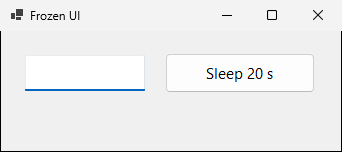
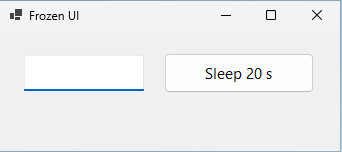
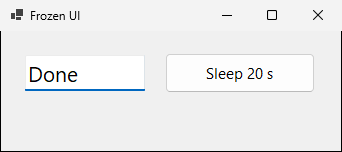
After 8 seconds the text box is still empty, although the handler had already set its Text to "Working": the text box can only redraw itself when the message pump handles its paint message, and the pump is stuck inside button1_Click. Working was never on screen. Our test script also asked for the text box's text 8 seconds after the click; the answer came back 11.8 seconds later, when the handler returned, and it was Done. A user who clicks, drags or types during those 20 seconds gets no reaction, and Windows may mark the window as Not Responding.
Worked example 17: counting on a worker thread
The fix seems obvious: do the work on another thread, so the UI thread can go back to the message pump. This version counts from 0 to 9, one number per second, on a background thread:
private void button1_Click(object sender, EventArgs e)
{
    var thread = new Thread(StartCounting);
    thread.IsBackground = true;
    thread.Start();
}

private void StartCounting()
{
    for (var i = 0; i < 10; i++)
    {
        textBox1.Text = i.ToString();
        Thread.Sleep(1000);
    }
}
The thread is a background thread so that closing the form ends the program even while it is counting. Predict what happens when you click the button while debugging (F5).
The program ends with an unhandled exception as soon as the worker thread sets textBox1.Text:
Unhandled exception. System.InvalidOperationException: Cross-thread operation not valid: Control 'textBox1' accessed from a thread other than the thread it was created on.The text box was created by the UI thread, and it may only be used from the UI thread. .NET checks this for you and throws the exception to show you the mistake.
The check only runs under the debugger
The check is controlled by the static property Control.CheckForIllegalCrossThreadCalls. It is on when the program runs under the Visual Studio debugger (F5). To get the same behaviour on our test machine, where no debugger is attached, we added one line to Main before Application.Run:
Control.CheckForIllegalCrossThreadCalls = true; // what F5 (debugging) doesWithout that line, we printed the property into the label and ran the same counting code:
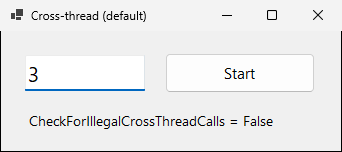
The property was False, no exception was thrown, and 3.5 seconds after the click the text box showed 3. The program only seems to work. The mistake is still there; nothing reports it any more. Never touch a control from a worker thread, whether or not an exception tells you so.
Worked example 18: Control.Invoke
Every control has an Invoke method. It takes a delegate and runs it on the UI thread, through the message pump. The worker thread no longer touches the text box; it asks the UI thread to do it:
namespace SyncDemo
{
    public partial class Form1 : Form
    {
        public Form1()
        {
            InitializeComponent();
        }

        private delegate void DisplayCountDelegate(int i);
        private delegate void EnableButtonDelegate();

        private void button1_Click(object sender, EventArgs e)
        {
            var thread = new Thread(StartCounting);
            thread.IsBackground = true;
            thread.Start();
            button1.Enabled = false;
        }

        private void StartCounting()
        {
            for (var i = 0; i < 10; i++)
            {
                textBox1.Invoke(new DisplayCountDelegate(DisplayCount), i);
                Thread.Sleep(1000);
            }
            button1.Invoke(new EnableButtonDelegate(EnableButton));
        }

        private void DisplayCount(int i)
        {
            textBox1.Text = i.ToString();
        }

        private void EnableButton()
        {
            button1.Enabled = true;
        }
    }
}
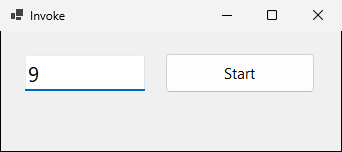
This program also sets CheckForIllegalCrossThreadCalls to true, and it ran without an exception.
- The click handler starts the thread and disables
button1, so a second click cannot start a second counting thread (two threads would mix their numbers in the text box). - The worker thread may not re-enable the button itself either, so it uses
Invokeagain, with a second delegate. - The window stayed responsive while the numbers counted up.

Worked example 19: BackgroundWorker
Delegates and Invoke calls make the code longer. The BackgroundWorker component does the same job with events:
DoWorkruns on a worker thread; start it withRunWorkerAsync().- The worker calls
ReportProgress(i), which raisesProgressChanged. RunWorkerCompletedis raised whenDoWorkhas finished.ProgressChangedandRunWorkerCompletedare raised on the thread that created theBackgroundWorker. Create it in the form's constructor, on the UI thread, and both handlers may use the controls directly. For this,WorkerReportsProgressmust betrue.
using System.ComponentModel;

namespace SyncDemo
{
    public partial class Form1 : Form
    {
        private readonly BackgroundWorker worker;

        public Form1()
        {
            InitializeComponent();

            worker = new BackgroundWorker();
            worker.WorkerReportsProgress = true;
            worker.DoWork += StartCounting;
            worker.ProgressChanged += worker_ProgressChanged;
            worker.RunWorkerCompleted += worker_RunWorkerCompleted;
        }

        private void button1_Click(object sender, EventArgs e)
        {
            worker.RunWorkerAsync();
            button1.Enabled = false;
        }

        private void StartCounting(object sender, DoWorkEventArgs e)
        {
            BackgroundWorker bgWorker = (BackgroundWorker)sender;
            for (var i = 0; i < 10; i++)
            {
                bgWorker.ReportProgress(i);
                Thread.Sleep(1000);
            }
        }

        private void worker_ProgressChanged(object sender, ProgressChangedEventArgs e)
        {
            textBox1.Text = e.ProgressPercentage.ToString();
        }

        private void worker_RunWorkerCompleted(object sender, RunWorkerCompletedEventArgs e)
        {
            button1.Enabled = true;
            label1.Text = "Completed";
        }
    }
}
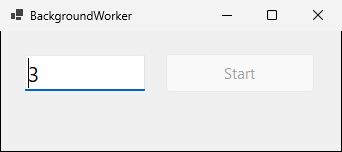
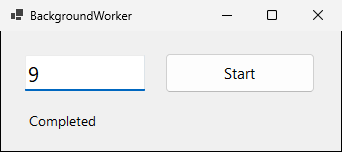
It ran without an exception, with the cross-thread check on. The completed handler re-enabled the button and wrote Completed into the label:
Practice
About 30 minutes. Solve on paper first, then type the program and run it to check yourself. Because the order of threads can change, run each program several times. The race condition simulator helps with problems 1 and 2, the Monitor widget with problem 4.
Practice 1: two withdrawals (about 6 minutes)
A bank account holds 500. At the same moment, thread ATM withdraws 300 and thread App (a banking app) withdraws 400.
using System;
using System.Threading;

class Program
{
    static int balance = 500;

    static void Main()
    {
        Thread t1 = new Thread(() => Withdraw(300)) { Name = "ATM" };
        Thread t2 = new Thread(() => Withdraw(400)) { Name = "App" };
        t1.Start(); t2.Start();
        t1.Join(); t2.Join();
        Console.WriteLine("Balance: " + balance);
    }

    static void Withdraw(int amount)
    {
        string name = Thread.CurrentThread.Name;
        if (amount <= balance)
        {
            Console.WriteLine(name + " withdraws " + amount);
            Thread.Sleep(100);                    // the bank's slow check
            balance = balance - amount;
        }
        else
        {
            Console.WriteLine(name + ": not enough money");
        }
    }
}- Mark the critical section.
- Predict the output and the final balance.
- Fix the program with
lock. Which outputs are possible then?
Practice 2: where is the lock? (about 6 minutes)
Two threads run Increment on a shared count that starts at 0; Main joins both threads and prints count. Three versions of Increment put the lock in different places:
// A
lock (lockCount) { for (int i = 0; i < 500000; i++) count++; }

// B
for (int i = 0; i < 500000; i++) { lock (lockCount) { count++; } }

// C
for (int i = 0; i < 500000; i++)
{
    int next = count + 1;
    lock (lockCount) { count = next; }
}- Which versions always print
count = 1000000? - In which version does one thread do all its increments before the other thread starts?
- In which version can the increments of the two threads interleave?
Practice 3: the shared printer (about 6 minutes)
Four threads share one printer. Each thread holds the lock for 3 pages of 200 ms each, and waits at most 1 second for the lock.
using System;
using System.Threading;

class Program
{
    private static readonly object lockPrinter = new object();

    static void Main()
    {
        Thread[] threads = new Thread[4];
        for (int i = 0; i < 4; i++)
        {
            threads[i] = new Thread(Print) { Name = "T" + (i + 1) };
            threads[i].Start();
        }
        foreach (Thread t in threads) t.Join();
    }

    static void Print()
    {
        string name = Thread.CurrentThread.Name;
        bool lockTaken = false;
        try
        {
            Monitor.TryEnter(lockPrinter, TimeSpan.FromSeconds(1), ref lockTaken);
            if (lockTaken)
            {
                for (int page = 1; page <= 3; page++)
                {
                    Thread.Sleep(200);            // one page takes 200 ms
                }
                Console.WriteLine(name + " printed 3 pages");
            }
            else
            {
                Console.WriteLine(name + " gave up");
            }
        }
        finally
        {
            if (lockTaken)
            {
                Monitor.Exit(lockPrinter);
            }
        }
    }
}
Predict how many threads print, and how many give up. Explain with the waiting times.
Practice 4: ping pong (about 8 minutes)
Write a program with a method Play(string word) that prints word followed by a space, 5 times. Start one thread with Play("ping"), wait 100 ms, and start a second thread with Play("pong"). After joining both threads, Main prints a new line and Game over. The output must be exactly:
ping pong ping pong ping pong ping pong ping pong
Game over
Use Monitor.Enter, Monitor.Pulse, Monitor.Wait and Monitor.Exit, as in the even and odd example. Which call must the last round skip, and why?
Practice 5: three slots (about 4 minutes)
Change the semaphore example (worked example 15): new Semaphore(3, 3), six threads, and 2 seconds of work (Thread.Sleep(2000)) for each thread. Predict the total time, and the largest number of threads inside at the same time.
Answers
Practice 1
The critical section is the if and the subtraction together: checking that the balance is large enough is only meaningful if nobody changes balance before the subtraction.
As written, all 20 of our runs printed both withdrawals and a negative balance. ATM came first in 10 runs and App in 10, for example:
ATM withdraws 300
App withdraws 400
Balance: -200
Both threads passed the check while the balance was still 500. Each subtraction reads balance again when it runs, so neither update is lost: 500 - 300 - 400 = -200.
The fix puts the whole if inside one lock:
static void Withdraw(int amount)
{
    string name = Thread.CurrentThread.Name;
    lock (lockBalance)
    {
        if (amount <= balance)
        {
            Console.WriteLine(name + " withdraws " + amount);
            Thread.Sleep(100);                // the bank's slow check
            balance = balance - amount;
        }
        else
        {
            Console.WriteLine(name + ": not enough money");
        }
    }
}
(with private static readonly object lockBalance = new object(); next to balance). Whichever thread gets the lock first withdraws; the other one finds too little money. In 20 runs:
| Runs | Output |
|---|---|
| 19 | ATM withdraws 300, App: not enough money, Balance: 200 |
| 1 | App withdraws 400, ATM: not enough money, Balance: 100 |
Practice 2
| Version | Result in 12 runs | Why |
|---|---|---|
| A | count = 1000000 in 12 | The whole loop is the critical section. One thread does all its increments, then the other thread does all of its. Correct, but the threads never run side by side. |
| B | count = 1000000 in 12 | Every count++ is protected. The lock is released after each increment, so the increments of the two threads interleave. |
| C | 12 different values, from 491,699 to 874,943 | Only the write is inside the lock. The read, count + 1, is outside it, so two threads can still read the same value and write the same result. |
- A and B. 2. A. 3. B (and C, which is why C is wrong). The read and the write of a shared variable must be in the same lock.
Practice 3
In 20 of 20 runs, two threads printed and two gave up, for example:
T1 printed 3 pages
T4 gave up
T2 gave up
T3 printed 3 pages
h = 3 x 200 = 600, where h is the time in milliseconds a thread holds the lock. The first thread gets the lock at once. The second waits about 600 ms, within its 1000 ms. The third and fourth would have to wait for two holders, about 1200 ms, which is more than 1000 ms, so they give up after 1 second, while the second thread is still printing. That is why both gave up lines come before the second printed line.
Practice 4
using System;
using System.Threading;

class Program
{
    const int rounds = 5;
    private static readonly object lockBall = new object();

    static void Main()
    {
        Thread ping = new Thread(() => Play("ping"));
        Thread pong = new Thread(() => Play("pong"));
        ping.Start();
        Thread.Sleep(100);                        // ping must serve first
        pong.Start();
        ping.Join();
        pong.Join();
        Console.WriteLine();
        Console.WriteLine("Game over");
    }

    static void Play(string word)
    {
        try
        {
            Monitor.Enter(lockBall);
            for (int i = 1; i <= rounds; i++)
            {
                Console.Write(word + " ");
                Monitor.Pulse(lockBall);          // wake the other player
                if (i != rounds)
                    Monitor.Wait(lockBall);       // hand the ball over and wait
            }
        }
        finally
        {
            Monitor.Exit(lockBall);
        }
    }
}
It printed the required two lines in 10 of 10 runs. The last round must skip Wait. After the last ping, pong still has its last round to play, and after the last pong nobody is left: a thread that called Wait there would never be pulsed, Join would never return, and the program would never end. The 100 ms sleep in Main makes sure that ping serves first.
Practice 5
0.0 s Thread 4 entered
0.0 s Thread 1 entered
0.0 s Thread 3 entered
2.0 s Thread 4 is leaving
2.0 s Thread 2 entered
2.0 s Thread 1 is leaving
2.0 s Thread 5 entered
2.0 s Thread 3 is leaving
2.0 s Thread 6 entered
4.0 s Thread 2 is leaving
4.0 s Thread 5 is leaving
4.0 s Thread 6 is leaving
All done at 4.0 s
T = r x s = 2 x 2 = 4: two rounds of three threads, 2 seconds each. At most 3 threads are inside at the same time. All 5 runs ended at 4.0 s.