

Loading the lesson...
In the print dialog, choose "Save as PDF" as the destination.
Operating Systems 1, Lab 1
Drag controls onto a form, set their properties, and make them react to events.
Part 1
A form, its controls, and the C# behind them
| In the designer | In C# |
|---|---|
Your form, Form1 | A class that inherits from Form, which already draws the title bar and the buttons |
| Drag a control onto the form | A new field of that control's class, and a new object in it |
| Change a value in Properties | Set a property of that object, for example Text |
| Double-click a control | A new method that runs when one of its events happens |
Part 2
A new project, one label, one property
DemoApplication and choose a location| Window | What it is for |
|---|---|
| Form Designer | The design surface where you build the form |
| Solution Explorer | The project files: Form1.cs and Program.cs |
| Toolbox | Every control you can add: Label, TextBox, Button, ... |
| Properties window | The properties of the selected control |
Program.cs starts the application; Form1.cs holds the code of the form
static void Main()
{
    ApplicationConfiguration.Initialize();
    Application.Run(new Form1());
}Application.Run(new Form1()) creates the first form and shows itpartial class: Form1.cs for your code, Form1.Designer.cs for the designer's codeHello WorldYou dragged a Label and typed Hello World into Text. Which lines appear in Form1.Designer.cs?
this.label1 = new System.Windows.Forms.Label();
this.label1.AutoSize = true;
this.label1.Location = new System.Drawing.Point(150, 110);
this.label1.Name = "label1";
this.label1.TabIndex = 0;
this.label1.Text = "Hello World";
this.Controls.Add(this.label1);
private System.Windows.Forms.Label label1;label1 = new Label();, no this.) and adds a label1.Size line.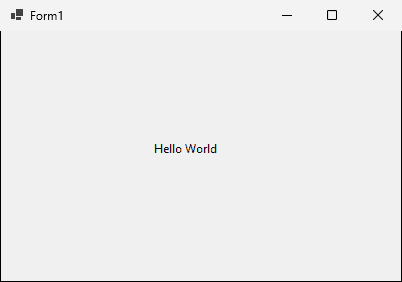
Part 3
Seven kinds of controls on one form
Enter a name and an address, choose a city, a gender, and the courses to learn
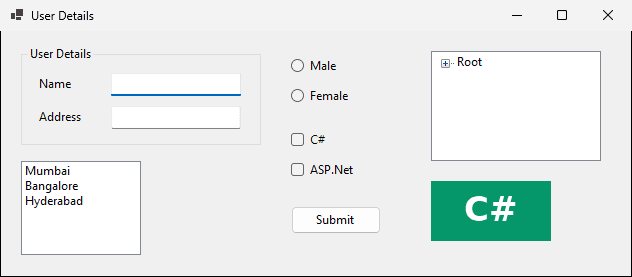
txtName and txtAddress| Control | Prefix | Example |
|---|---|---|
| TextBox | txt | txtName, txtAddress |
| ListBox | lst | lstCity |
| RadioButton | rd | rdMale, rdFemale |
| CheckBox | chk | chkC, chkASP |
| Button | btn | btnSubmit |
lstCitythis.lstCity.Items.AddRange(new object[] {
"Mumbai",
"Bangalore",
"Hyderabad"});Gender: one answer. Courses: C#, ASP.Net, or both. Which control fits each?
| Control | The user chooses | Our controls |
|---|---|---|
| RadioButton | exactly one option | rdMale, rdFemale |
| CheckBox | several options | chkC, chkASP |
The Submit button will read everything the user entered
| Control | Text | Name |
|---|---|---|
| RadioButton | Male | rdMale |
| RadioButton | Female | rdFemale |
| CheckBox | C# | chkC |
| CheckBox | ASP.Net | chkASP |
| Button | Submit | btnSubmit |
Part 4
Code that runs when something happens
Double-click the ListBox in the Form Designer. The method then runs whenever an item is selected.
// Form1.cs: an empty method
private void lstCity_SelectedIndexChanged(object sender, EventArgs e)
{

}
// Form1.Designer.cs: one line that wires it to the event
this.lstCity.SelectedIndexChanged +=
new System.EventHandler(this.lstCity_SelectedIndexChanged);Double-click creates the handler for this one. Read from Windows Forms by a program we ran.
| Control | Default event |
|---|---|
| Button, Label | Click |
| TextBox | TextChanged |
| ListBox | SelectedIndexChanged |
| CheckBox, RadioButton | CheckedChanged |
| The form itself | Load |
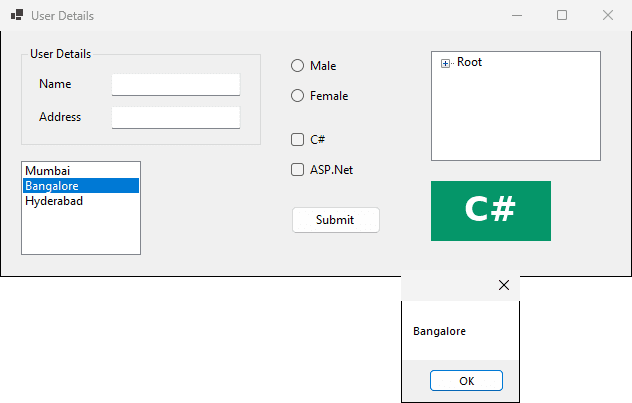
private void lstCity_SelectedIndexChanged(object sender, EventArgs e)
{
    string text = lstCity.GetItemText(lstCity.SelectedItem);
    MessageBox.Show(text);
}lstCity.SelectedItem: the item the user selectedGetItemText gets its text, stored in textMessageBox.Show displays itWhat appears on the screen?
Double-click the button, then add three lines
private void btnSubmit_Click(object sender, EventArgs e)
{
    string name = txtName.Text;
    string address = txtAddress.Text;
    MessageBox.Show(name + address);
}name and addressThe user types Student and Mansoura, then clicks Submit. What exactly does the box say?
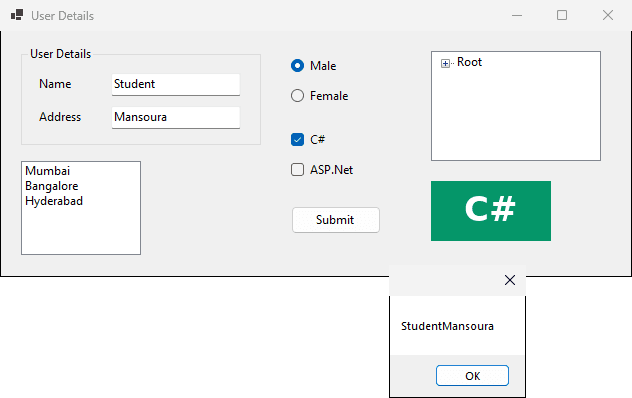
The Name property says txtUser, but the handler still reads txtName.Text. What happens?
Form1.cs(21,27): error CS0103: The name 'txtName' does not exist in the current contextPart 5
A tree of nodes and a picture
Lists items like a tree, as Windows Explorer shows folders
RootRoot
Label
Button
Checkbox
Four nodes. Which objects are created, and in what order?
TreeNode treeNode1 = new TreeNode("Label");
TreeNode treeNode2 = new TreeNode("Button");
TreeNode treeNode3 = new TreeNode("Checkbox");
TreeNode treeNode4 = new TreeNode("Root",
    new TreeNode[] { treeNode1, treeNode2, treeNode3 });
this.treeView1.Nodes.AddRange(new TreeNode[] { treeNode4 });Student and Mansoura typed, Male and C# selected
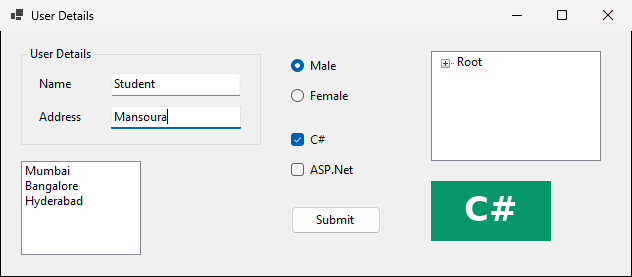
Part 6
About 30 minutes: build it, run it, compare
About 10 minutes
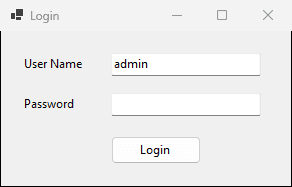
| Control | Text | Name |
|---|---|---|
| Label | User Name | label1 |
| Label | Password | label2 |
| TextBox | (empty) | txtUser, txtPassword |
| Button | Login | btnLogin |
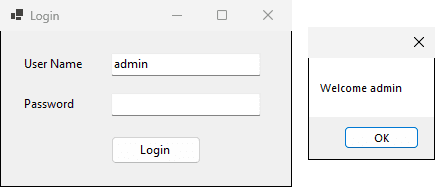
private void btnLogin_Click(object sender, EventArgs e)
{
    string user = txtUser.Text;
    MessageBox.Show("Welcome " + user);
}
About 4 minutes
Each handler reads name and address from the text boxes. The user types Student and Cairo: write the exact message of each button.
// button A
MessageBox.Show(name + " " + address);
// button B
MessageBox.Show("Name: " + name);
// button C
MessageBox.Show(address + name);| Button | Message on screen |
|---|---|
| A | Student Cairo |
| B | Name: Student |
| C | CairoStudent |
About 8 minutes
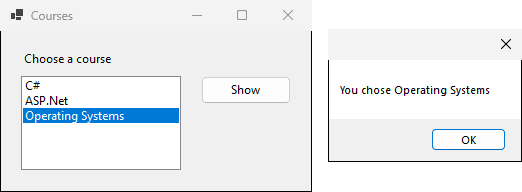
Courses, a Label Choose a courselstCourse: C#, ASP.Net, Operating SystemsbtnShow, Text Show: shows You chose + the selected course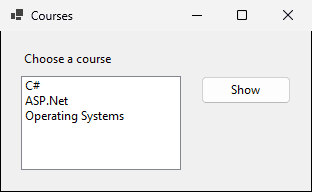
private void btnShow_Click(object sender, EventArgs e)
{
    string course = lstCourse.GetItemText(lstCourse.SelectedItem);
    MessageBox.Show("You chose " + course);
}
About 4 minutes
The ListBox is named lstCourse. Will this run?
private void btnShow_Click(object sender, EventArgs e)
{
    string course = lstCourses.GetItemText(lstCourses.SelectedItem);
    MessageBox.Show("You chose " + course);
}Form1.cs(12,29): error CS0103: The name 'lstCourses' does not exist in the current context
Form1.cs(12,52): error CS0103: The name 'lstCourses' does not exist in the current contextAbout 4 minutes
A student registration form: pick a control and a Name for each
| Information | Control | Name |
|---|---|---|
| Full name | TextBox | txtName |
| Faculty level | 4 RadioButtons | rdLevel1 to rdLevel4 |
| Hobbies | 4 CheckBoxes | chkReading, chkSport, ... |
| City | ListBox | lstCity |
| Save | Button | btnSave |
Mahmoud Abas|Windows Forms: Your First Desktop Form