In the print dialog, choose "Save as PDF" as the destination.
Operating Systems 1, Lab 4
Draw on a form with GDI+, then make the picture move with a Timer.
Math.Cos and Math.SinPart 1
A Graphics object, a Pen, a Brush, and pixel coordinates
System.Drawing). Every drawing method, DrawLine, FillEllipse, DrawString, belongs to it.| Way to get one | Code | Use it when |
|---|---|---|
| The Paint event | Graphics g = e.Graphics; | you draw the form's picture (the usual way) |
CreateGraphics | Graphics g = this.CreateGraphics(); | you draw on a form that already exists |
| From an image | Graphics.FromImage(myBitmap) | you change an existing image |
private void Form1_Paint(object sender, PaintEventArgs e)
{
Graphics g = e.Graphics;
// draw here
}(0, 0) is the top-left corner of the client areax grows to the right; y grows down, not up as in geometry classDrawLine(myPen, 2, 2, 4, 1) is almost invisiblepublic Form1()
{
InitializeComponent();
this.Width = 500;
this.Height = 500;
}Pen myPen = new Pen(Color.Black); // width 1
Pen bluePen = new Pen(Color.Blue, 3); // width 3
SolidBrush myBrush = new SolidBrush(Color.Red);
SolidBrush orange = new SolidBrush(
Color.FromArgb(255, 255, 140, 0)); // alpha, red, green, blue| Object | Paints | Used by |
|---|---|---|
| Pen | the outline | DrawLine, DrawRectangle, DrawEllipse, DrawArc, DrawPolygon |
| Brush | the inside | FillRectangle, FillEllipse, FillPolygon, DrawString |
In Form1_Paint. Predict which two points the line joins, and the four corners of the rectangle.
g.DrawLine(myPen, 20, 20, 400, 420); // x1, y1, x2, y2
g.DrawRectangle(myPen, 100, 100, 200, 150); // x, y, width, height(20, 20) to (400, 420)(100, 100) and (300, 100)(100, 250) and (300, 250)(x, y): top-left corner; w, h: width and height; (x_2, y_2): bottom-right cornerPredict: what shape is it, where is its centre, and does it touch the rectangle from the last slide?
g.DrawEllipse(myPen, 300, 200, 50, 50); // the bounding rectangle: x, y, width, height25(300 + 25, 200 + 25) = (325, 225)(300, 225): on the rectangle's right side (x = 300, y from 100 to 250). They touch.g.DrawArc(myPen, x, y, width, height,
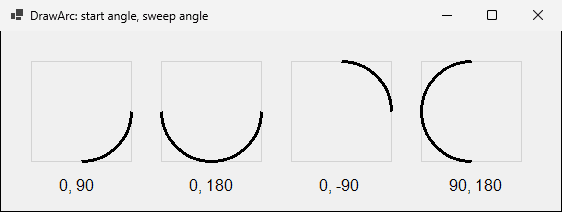
startAngle, sweepAngle);DrawEllipsestartAngle: degrees from the x-axis; 0 is the right-hand pointsweepAngle: how far to draw, clockwise (because y grows down)Four 100 x 100 boxes, pen width 3. Predict the part of the circle each call draws.
g.DrawArc(arcPen, x, 30, 100, 100, 0, 90);
g.DrawArc(arcPen, x, 30, 100, 100, 0, 180);
g.DrawArc(arcPen, x, 30, 100, 100, 0, -90);
g.DrawArc(arcPen, x, 30, 100, 100, 90, 180);
The four calls so far, plus text, black pen, red brush, a 500 x 500 form. Sketch it, then compare.
g.DrawArc(myPen, 400, 100, 50, 50, 0, 90);
g.DrawString("Hello World", new Font("Arial", 16), myBrush, 150, 400);
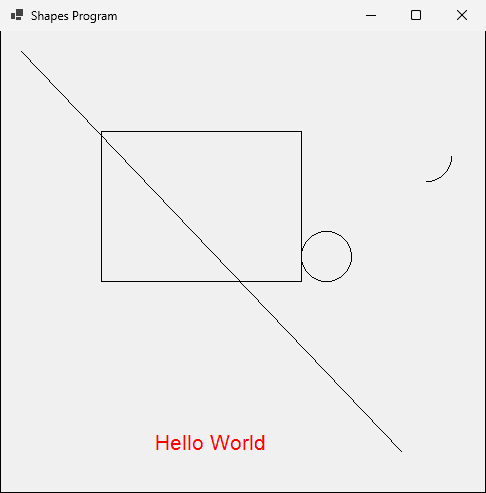
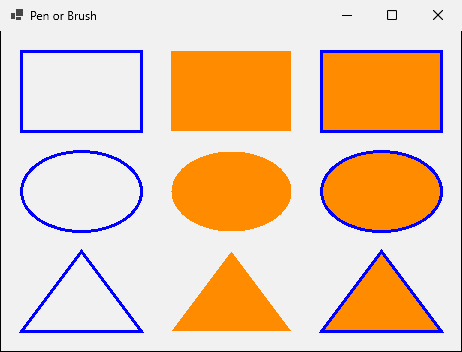
(300, 225)(150, 400) is the text's top-left cornerBlue pen of width 3, orange brush. Column 1 draws, column 2 fills, column 3 fills then draws.
g.DrawRectangle(bluePen, 20, 20, 120, 80);
g.FillRectangle(orangeBrush, 170, 20, 120, 80);
g.FillRectangle(orangeBrush, 320, 20, 120, 80);
g.DrawRectangle(bluePen, 320, 20, 120, 80);
// the same three columns for Ellipse and for Polygon (a Point[] triangle)
Part 2
Paint versus CreateGraphics
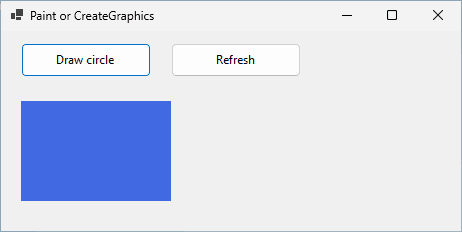
Invalidate(): "repaint me when you can"Refresh(): clear the area and repaint nowPaint fills a blue rectangle. Load and the button each draw a circle with CreateGraphics. Predict the window when it opens.
private void Form1_Load(object sender, EventArgs e)
{
Graphics formGraphics = this.CreateGraphics();
formGraphics.FillEllipse(greenBrush, 200, 70, 100, 100);
formGraphics.Dispose();
}
private void drawButton_Click(object sender, EventArgs e)
{
Graphics formGraphics = this.CreateGraphics();
formGraphics.FillEllipse(redBrush, 330, 70, 100, 100);
formGraphics.Dispose();
}
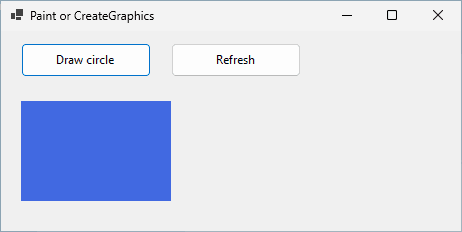
Click Draw circle, then click Refresh (this.Refresh();).
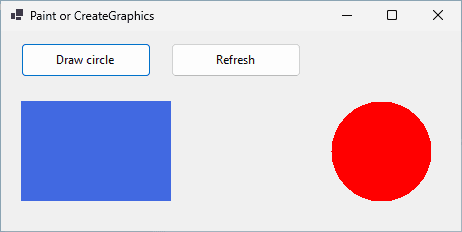

| Drawn in | After the next repaint |
|---|---|
Paint with e.Graphics | drawn again: it stays |
a click with CreateGraphics | erased: nobody draws it again |
| Load | never seen |
Part 3
Two panels, four text boxes, and a little trigonometry

controlPanel: Dock = Top, holds four text boxes and Gocanvas: Dock = Fill, white; we handle its Paint eventcanvas.Refresh(): clear it and raise Paint| Symbol | Meaning |
|---|---|
(x_1, y_1), (x_2, y_2) | start and end of a line |
L | its length (pixels) |
θ | its angle (degrees) |
α, d | the Angle and Increment boxes |
int startX = canvas.Width / 2, startY = canvas.Height / 2; // the centre
int myAngle = 0; // first line points right
for (int i = 0; i < lines; i++)
{
int endX = (int)(startX + Math.Cos(myAngle * Math.PI / 180) * myLength);
int endY = (int)(startY + Math.Sin(myAngle * Math.PI / 180) * myLength);
Point[] points = { new Point(startX, startY), new Point(endX, endY) };
g.DrawLines(myPen, points);
startX = endX; startY = endY; // the next line starts here
myAngle = myAngle + turn; // the Angle box
myLength = myLength + step; // the Increment box
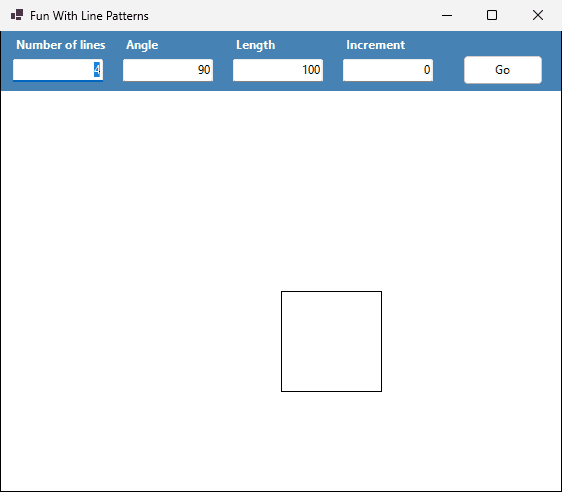
}The canvas is 560 x 400, so the centre is (280, 200). Predict the four end points.
| Line | θ | From | To |
|---|---|---|---|
| 1 | 0 | (280, 200) | (380, 200) |
| 2 | 90 | (380, 200) | (380, 300) |
| 3 | 180 | (380, 300) | (280, 300) |
| 4 | 270 | (280, 300) | (280, 200) |
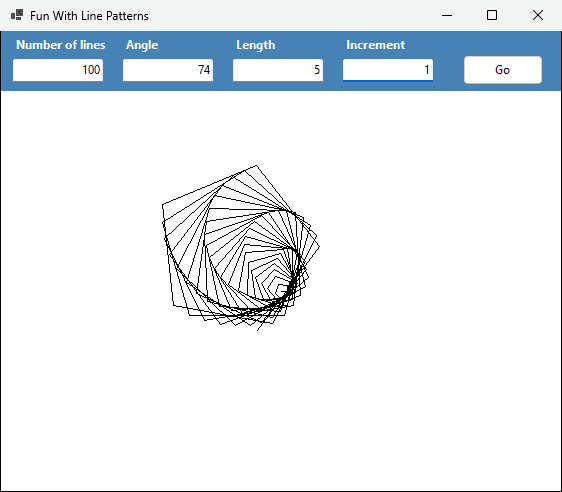
Line 1 goes from (280, 200) to (285, 200). Predict the end of line 2: θ = 74, L = 6.
Part 4
Change a number, ask for a repaint, repeat
| Member | Meaning |
|---|---|
Interval | milliseconds between two Tick events |
Enabled | true: the timer is running |
Tick | the event; double-click the timer to create its handler |
int x = 10;
int y = 70;
private void Form1_Paint(object sender, PaintEventArgs e)
{
e.Graphics.FillRectangle(redBrush, x, y, 50, 50);
e.Graphics.DrawString("x = " + x, this.Font, Brushes.Black, 10, 10);
}
private void timer1_Tick(object sender, EventArgs e) // Interval = 50
{
x += 5;
this.Invalidate();
}x grows by 5 pxInvalidate() asks Windows for a new Paintxx starts at 10. Predict x after 20 ticks, then look at three screenshots of the running form.

The Tick handler is now only x += 5;. Predict what the window shows.

tick 10 at 642 ms: x = 60
tick 30 at 1909 ms: x = 160
tick 50 at 3177 ms: x = 260v: speed (px/s), s: step per tick (px), T: Interval (ms)| Interval | Measured gap | Ticks measured |

|---|---|---|
| 10 | 16.4 ms | 250 |
| 25 | 31.7 ms | 180 |
| 50 | 62.6 ms | 40 |
| 100 | 110.8 ms | 28 |
Part 5
The same Tick, with a few more ideas
int L1x = 5; // fields: outside every method,
int L1y = 5; // so they keep their value between ticks
private void timer1_Tick(object sender, EventArgs e)
{
label1.Left -= L1x;
label1.Top -= L1y;
if (label1.Left + label1.Width > ClientSize.Width || label1.Left < 0)
L1x = -L1x; // bounce off the left or right border
if (label1.Top + label1.Height > ClientSize.Height || label1.Top < 0)
L1y = -L1y; // bounce off the top or bottom border
}L1x, L1y are fields: declared inside Tick, they would reset to 5 every tickLeft and Top: no Paint code|| means or: past the right edge or the left edgelabelA: Left = 230, Width = 50, speed +10. ClientSize.Width = 300. Predict Left and the speed for ticks 1 to 5.
| Tick | Left after the move | Left + Width > 300? | Speed after the tick |
|---|---|---|---|
| 1 | 240 | 290: no | 10 |
| 2 | 250 | 300: no (not greater) | 10 |
| 3 | 260 | 310: yes | -10 |
| 4 | 250 | 300: no | -10 |
| 5 | 240 | 290: no | -10 |

L1x, L1y for label1, L2x, L2y for label2-=), label2 adds it (+=): they start in opposite directionsenum Position { Left, Right, Up, Down }
Position objectPosition = Position.Right;
private void Form1_KeyDown(object sender, KeyEventArgs e)
{
if (e.KeyCode == Keys.Left) objectPosition = Position.Left;
else if (e.KeyCode == Keys.Right) objectPosition = Position.Right;
else if (e.KeyCode == Keys.Up) objectPosition = Position.Up;
else if (e.KeyCode == Keys.Down) objectPosition = Position.Down;
}// in timer1_Tick
if (objectPosition == Position.Right) x += 5;
else if (objectPosition == Position.Left) x -= 5;
else if (objectPosition == Position.Up) y -= 5;
else if (objectPosition == Position.Down) y += 5;
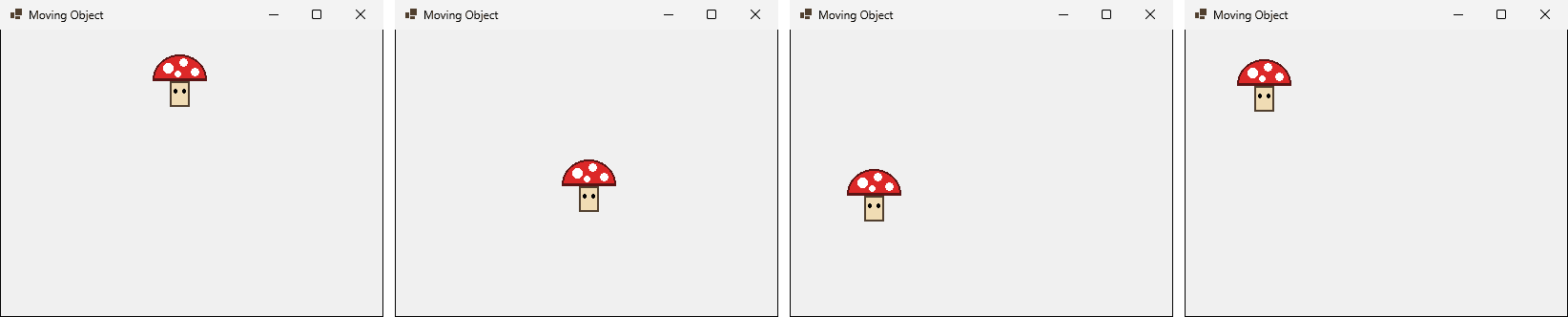
this.Invalidate();Bitmap picture = new Bitmap("mushroom.png"); // a field: load once
private void Form1_Paint(object sender, PaintEventArgs e)
{
e.Graphics.DrawImage(picture, x, y, 64, 64);
}.exe
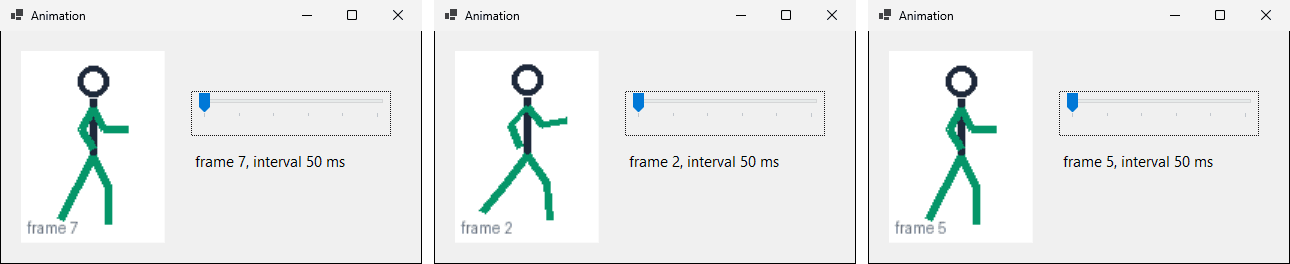
private string[] frames = { "frames/run0.png", /* ... */ "frames/run7.png" };
private int currentFrame = 0;
private void animationTimer_Tick(object sender, EventArgs e)
{
currentFrame = (currentFrame + 1) % frames.Length; // 0, 1, ..., 7, 0, ...
frameImage.Image = images[currentFrame];
}% (remainder) wraps 8 back to 0, no if neededTrackBar Minimum = 50, Maximum = 100. Its ValueChanged handler runs animationTimer.Interval = speedBar.Value;
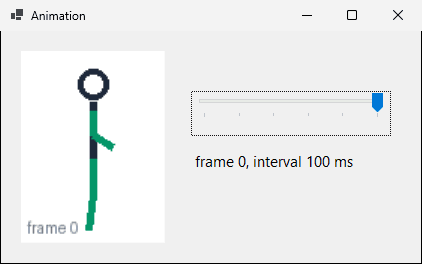
62.8 ms at 50, 110.8 ms at 100Both buttons grow a blue panel to 300 x 200, one pixel at a time. Predict what each one looks like.
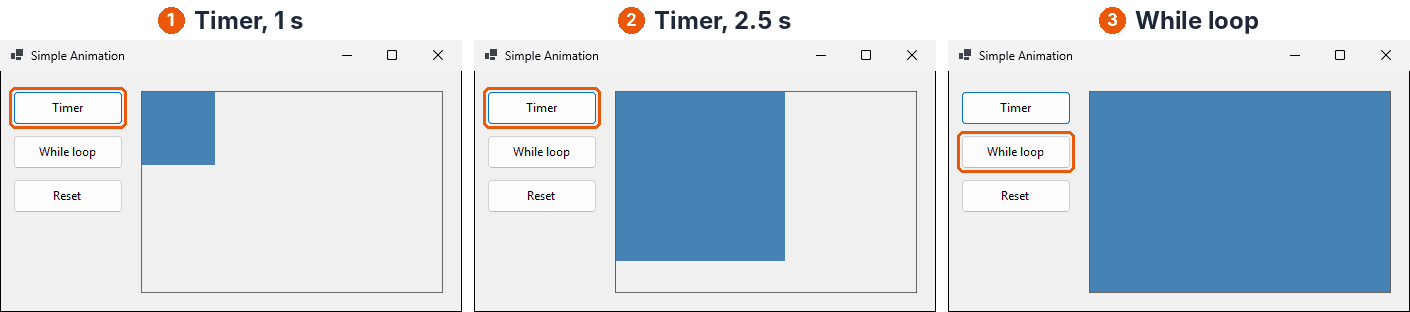
private void tmrMain_Tick(object sender, EventArgs e) // Interval = 10
{
if (pnlMain.Width < targetWidth) pnlMain.Width++;
if (pnlMain.Height < targetHeight) pnlMain.Height++;
}private void btnAnimation2_Click(object sender, EventArgs e)
{
pnlMain.Height = targetHeight;
while (pnlMain.Width < targetWidth)
pnlMain.Width++;
}
About 7 minutes
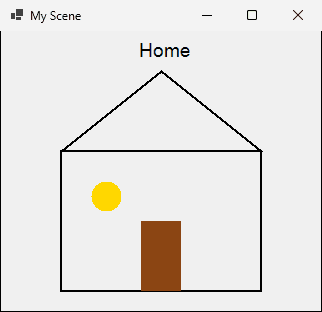
Pen myPen = new Pen(Color.Black, 2);
g.DrawRectangle(myPen, 60, 120, 200, 140); // walls
Point[] roof = { new Point(60, 120),
new Point(160, 40), new Point(260, 120) };
g.DrawPolygon(myPen, roof); // roof
g.FillRectangle(doorBrush, 140, 190, 40, 70); // door
g.FillEllipse(windowBrush, 90, 150, 30, 30); // window
g.DrawString("Home", new Font("Arial", 14), Brushes.Black, 135, 8);(60, 120), (260, 120), (60, 260), (260, 260); roof peak (160, 40)190 + 70 = 260 = the wall's bottom: yes, it stands on it(105, 165), radius 15
About 7 minutes
labelB: Left = 20, Width = 40, speed -8. ClientSize.Width = 300. Same if as label1.
Left and the speed after each of ticks 1 to 5|| is true?Left the label ever has?| Tick | Left | Speed after the tick |
|---|---|---|
| 1 | 12 | -8 |
| 2 | 4 | -8 |
| 3 | -4 | 8 |
| 4 | 4 | 8 |
| 5 | 12 | 8 |
About 6 minutes
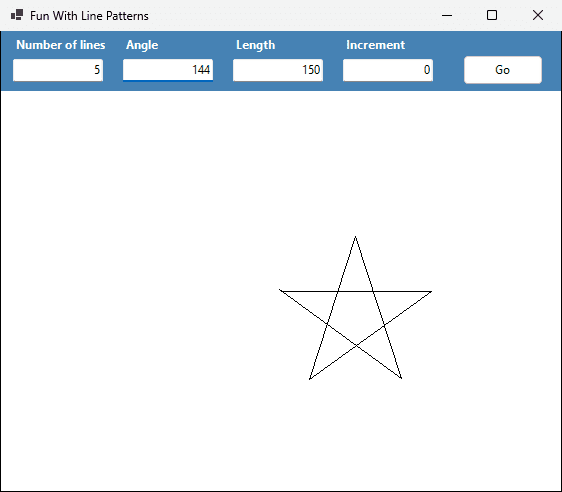
Line patterns app: 5 lines, Angle 144, Length 150, Increment 0.
(280, 200))(280, 200)?(280, 200) to (430, 200)(430, 200) to (308, 288)5 * 144 = 720, two full turns(278, 198): (int) drops a little each line
About 10 minutes
L3x = 3 and L3y = 7, and make label3 move with += and bounceLeft = 150, Top = 160, size 92 x 32; ClientSize is 420 x 300label3.Left += L3x;
label3.Top += L3y;
if (label3.Left + label3.Width > ClientSize.Width || label3.Left < 0)
{
L3x = -L3x;
}
if (label3.Top + label3.Height > ClientSize.Height || label3.Top < 0)
{
L3y = -L3y;
}Top = 272, 272 + 32 = 304 > 300150 + 3k + 92 > 420 needs k > 59.3, much latertick 16: label3 (198, 272) L3y -7e.Graphics: Windows asks for the picture again and again(0, 0) is top-left, y grows down; shapes are given by a corner, a width and a heightInvalidate()Mahmoud Abas|C# Graphics and Animation