

جارٍ تحميل الدرس...
في نافذة الطباعة اختر «حفظ كملف PDF» كوجهة.
نظم التشغيل 1، الدرس العملي 1
اسحب عناصر التحكم (controls) إلى نموذج (form)، واضبط خصائصها (properties)، واجعلها تستجيب للأحداث (events).
الجزء 1
النموذج، وعناصر التحكم فيه، وشيفرة C# التي خلفها
| في المصمم | في C# |
|---|---|
نموذجك، Form1 | صنف (class) يرث من Form، وهو صنف يرسم مسبقا شريط العنوان والأزرار |
| اسحب عنصر تحكم إلى النموذج | حقل (field) جديد من صنف عنصر التحكم ذلك، وكائن (object) جديد فيه |
| غير قيمة في الخصائص | ضبط خاصية لذلك الكائن، مثل Text |
| انقر نقرا مزدوجا على عنصر تحكم | دالة (method) جديدة تعمل عندما يقع أحد أحداثه |
الجزء 2
مشروع جديد، وتسمية واحدة، وخاصية واحدة
DemoApplication واختر مكانا لحفظه| النافذة | الغرض منها |
|---|---|
| مصمم النماذج | سطح التصميم الذي تبني عليه النموذج |
| مستكشف الحلول (Solution Explorer) | ملفات المشروع: Form1.cs وProgram.cs |
| صندوق الأدوات | كل عنصر تحكم يمكنك إضافته: Label وTextBox وButton وغيرها |
| نافذة الخصائص | خصائص عنصر التحكم المختار |
يبدأ Program.cs التطبيق؛ ويحتوي Form1.cs على شيفرة النموذج
static void Main()
{
    ApplicationConfiguration.Initialize();
    Application.Run(new Form1());
}Application.Run(new Form1()) النموذج الأول ويعرضهpartial): Form1.cs لشيفرتك، وForm1.Designer.cs لشيفرة المصممHello Worldسحبت Label وكتبت Hello World في Text. ما الأسطر التي تظهر في Form1.Designer.cs؟
this.label1 = new System.Windows.Forms.Label();
this.label1.AutoSize = true;
this.label1.Location = new System.Drawing.Point(150, 110);
this.label1.Name = "label1";
this.label1.TabIndex = 0;
this.label1.Text = "Hello World";
this.Controls.Add(this.label1);
private System.Windows.Forms.Label label1;label1 = new Label(); دون this.) ويضيف سطر label1.Size.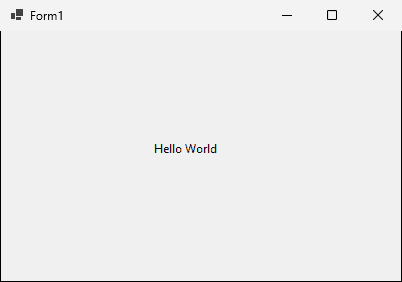
الجزء 3
سبعة أنواع من عناصر التحكم على نموذج واحد
أدخل اسما وعنوانا، واختر مدينة وجنسا والمقررات التي تريد تعلمها
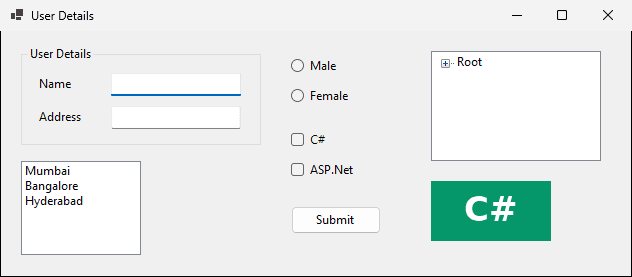
txtName وtxtAddress| عنصر التحكم | البادئة | مثال |
|---|---|---|
| TextBox | txt | txtName وtxtAddress |
| ListBox | lst | lstCity |
| RadioButton | rd | rdMale وrdFemale |
| CheckBox | chk | chkC وchkASP |
| Button | btn | btnSubmit |
lstCitythis.lstCity.Items.AddRange(new object[] {
"Mumbai",
"Bangalore",
"Hyderabad"});الجنس: إجابة واحدة. المقررات: C# أو ASP.Net أو كلاهما. أي عنصر تحكم يناسب كلا منهما؟
| عنصر التحكم | يختار المستخدم | عناصر التحكم لدينا |
|---|---|---|
| RadioButton | خيارا واحدا بالضبط | rdMale وrdFemale |
| CheckBox | عدة خيارات | chkC وchkASP |
سيقرأ الزر Submit كل ما أدخله المستخدم
| عنصر التحكم | Text | Name |
|---|---|---|
| RadioButton | Male | rdMale |
| RadioButton | Female | rdFemale |
| CheckBox | C# | chkC |
| CheckBox | ASP.Net | chkASP |
| Button | Submit | btnSubmit |
الجزء 4
شيفرة تعمل عندما يقع شيء ما
انقر نقرا مزدوجا على ListBox في مصمم النماذج. عندئذ تعمل الدالة كلما اختير عنصر.
// Form1.cs: an empty method
private void lstCity_SelectedIndexChanged(object sender, EventArgs e)
{

}
// Form1.Designer.cs: one line that wires it to the event
this.lstCity.SelectedIndexChanged +=
new System.EventHandler(this.lstCity_SelectedIndexChanged);ينشئ النقر المزدوج معالج هذا الحدث الافتراضي (default event). قرأنا هذه الأحداث من نماذج ويندوز ببرنامج شغلناه.
| عنصر التحكم | الحدث الافتراضي |
|---|---|
| Button وLabel | Click |
| TextBox | TextChanged |
| ListBox | SelectedIndexChanged |
| CheckBox وRadioButton | CheckedChanged |
| النموذج نفسه | Load |
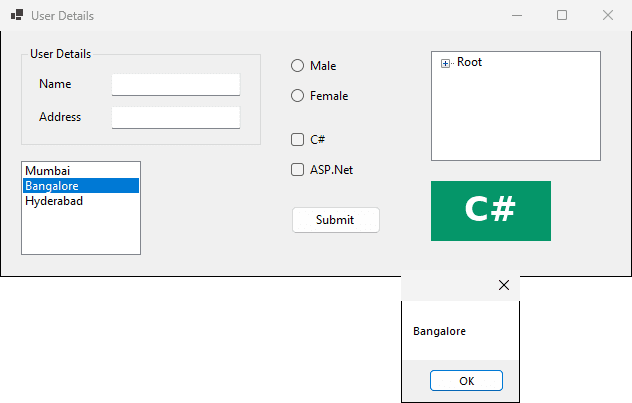
private void lstCity_SelectedIndexChanged(object sender, EventArgs e)
{
    string text = lstCity.GetItemText(lstCity.SelectedItem);
    MessageBox.Show(text);
}lstCity.SelectedItem: العنصر الذي اختاره المستخدمGetItemText نصه، ويخزن في textMessageBox.Show في مربع رسالة (message box)ماذا يظهر على الشاشة؟
انقر نقرا مزدوجا على الزر، ثم أضف ثلاثة أسطر
private void btnSubmit_Click(object sender, EventArgs e)
{
    string name = txtName.Text;
    string address = txtAddress.Text;
    MessageBox.Show(name + address);
}name وaddressيكتب المستخدم Student وMansoura، ثم ينقر Submit. ماذا يقول المربع بالضبط؟
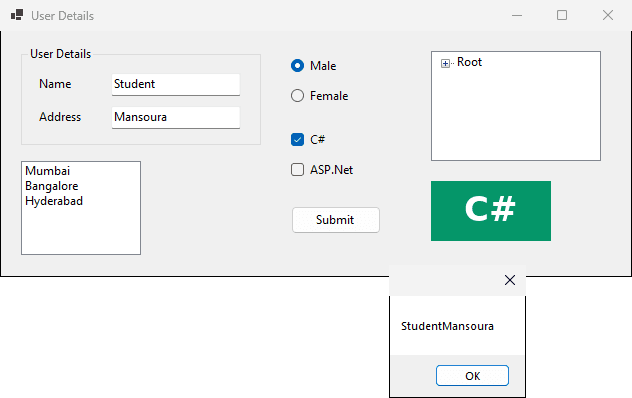
قيمة الخاصية Name هي txtUser، لكن المعالج ما زال يقرأ txtName.Text. ماذا يحدث؟
Form1.cs(21,27): error CS0103: The name 'txtName' does not exist in the current contextالجزء 5
شجرة من العقد وصورة
يسرد العناصر على هيئة شجرة، كما يعرض مستكشف ويندوز (Windows Explorer) المجلدات
RootRoot
Label
Button
Checkbox
أربع عقد. ما الكائنات التي تنشأ، وبأي ترتيب؟
TreeNode treeNode1 = new TreeNode("Label");
TreeNode treeNode2 = new TreeNode("Button");
TreeNode treeNode3 = new TreeNode("Checkbox");
TreeNode treeNode4 = new TreeNode("Root",
    new TreeNode[] { treeNode1, treeNode2, treeNode3 });
this.treeView1.Nodes.AddRange(new TreeNode[] { treeNode4 });كتب Student وMansoura، واختير Male وC#
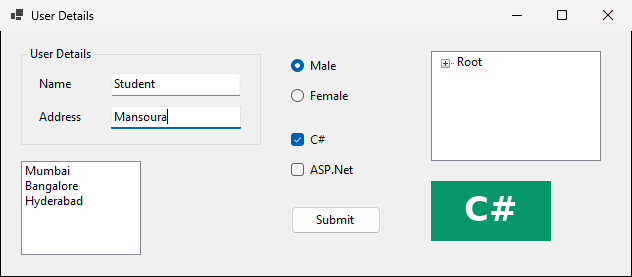
الجزء 6
نحو 30 دقيقة: ابن، وشغل، وقارن
نحو 10 دقائق
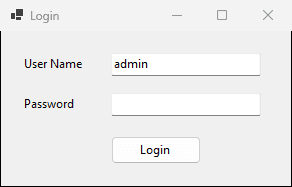
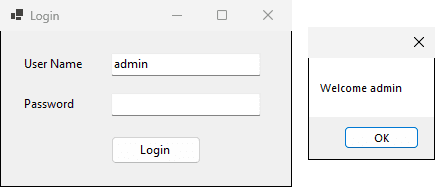
| عنصر التحكم | Text | Name |
|---|---|---|
| Label | User Name | label1 |
| Label | Password | label2 |
| TextBox | (فارغ) | txtUser وtxtPassword |
| Button | Login | btnLogin |
private void btnLogin_Click(object sender, EventArgs e)
{
    string user = txtUser.Text;
    MessageBox.Show("Welcome " + user);
}
نحو 4 دقائق
يقرأ كل معالج name وaddress من مربعي النص. يكتب المستخدم Student وCairo: اكتب الرسالة الدقيقة لكل زر.
// button A
MessageBox.Show(name + " " + address);
// button B
MessageBox.Show("Name: " + name);
// button C
MessageBox.Show(address + name);| الزر | الرسالة على الشاشة |
|---|---|
| A | Student Cairo |
| B | Name: Student |
| C | CairoStudent |
نحو 8 دقائق
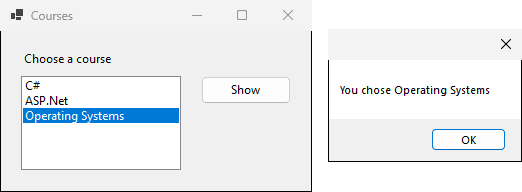
Courses، وLabel نصه Choose a courselstCourse: C# وASP.Net وOperating SystemsbtnShow وقيمة Text له Show: يعرض You chose + المقرر المختار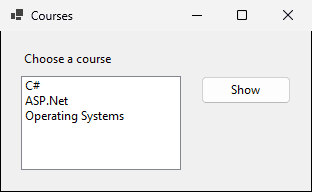
private void btnShow_Click(object sender, EventArgs e)
{
    string course = lstCourse.GetItemText(lstCourse.SelectedItem);
    MessageBox.Show("You chose " + course);
}
نحو 4 دقائق
اسم ListBox هو lstCourse. هل تعمل هذه الشيفرة؟
private void btnShow_Click(object sender, EventArgs e)
{
    string course = lstCourses.GetItemText(lstCourses.SelectedItem);
    MessageBox.Show("You chose " + course);
}Form1.cs(12,29): error CS0103: The name 'lstCourses' does not exist in the current context
Form1.cs(12,52): error CS0103: The name 'lstCourses' does not exist in the current contextنحو 4 دقائق
نموذج تسجيل طالب: اختر عنصر تحكم وقيمة Name لكل معلومة
| المعلومة | عنصر التحكم | Name |
|---|---|---|
| الاسم الكامل | TextBox | txtName |
| المستوى الدراسي | 4 أزرار RadioButton | rdLevel1 إلى rdLevel4 |
| الهوايات | 4 خانات CheckBox | chkReading وchkSport وغيرهما |
| المدينة | ListBox | lstCity |
| الحفظ | Button | btnSave |
Mahmoud Abas|نماذج ويندوز: نموذجك الأول لسطح المكتب